Paying in China
without the guesswork.
Set up one strong mobile option, then carry two backups. This field guide explains how international visitors can use mobile payments, cards and RMB cash—and what to do when a payment fails.
The best way to pay in China is not a single app. For a short visit, prepare Alipay or Weixin Pay with an eligible international card, keep the physical card, and carry some RMB cash. That three-layer setup covers most everyday failure cases.

AI-assisted editorial scene. It shows a generic payment moment, not a specific merchant, live payment screen or verified transaction.
China’s official visitor guidance describes five basic payment methods: bank cards, mobile payment, cash, bank accounts and e-CNY. Most tourists do not need to open a local bank account. The practical choice is to make mobile payment convenient without making it your only way to pay.
Payment products can change card support, identity checks, limits and fees. We explain the stable workflow here and link to official sources for details that may change.
Build a three-layer payment stack
No payment method works everywhere. Prepare these layers before departure and test them with a small purchase after arrival.
Mobile payment
Set up Alipay or Weixin Pay and link an eligible international card. This is usually the most convenient option for QR-based everyday payments.
Physical card
Carry the card linked to the app plus a second card from another account or network. Look for acceptance logos at the merchant or ATM.
RMB cash
Keep a modest amount in smaller notes for a dead phone, lost connection, rejected card or a cash-friendly local situation.
Set up while you still have reliable access
- 01
Install from the official app store
Download Alipay or WeChat only from the official Apple App Store, Google Play listing or provider site. Avoid unofficial APK files and lookalike apps.
- 02
Register with your mobile number
Official guidance says overseas visitors can use an overseas or Chinese mobile number. Use a number that can receive security messages while travelling.
- 03
Link an eligible international card
The issuing bank must approve the link. If it fails, contact the issuer, enable overseas transactions if required, or try a different eligible card.
- 04
Complete requested identity checks
Follow the app’s current verification flow. Names and document details should match exactly; never send passport images to an unofficial helper.
- 05
Keep independent backups
Bring the physical cards, store issuer support numbers separately, and obtain a small RMB cash reserve after arrival if needed.
Need every tap explained? Follow the new visual Alipay setup guide for foreign visitors, including overseas-number registration, conditional passport checks, international-card verification and a first small payment.
At the checkout: scan or show?
Start with the direction the cashier supports. The two flows below are the stable part of the process; exact button labels and positions can change with app version, language and account state.
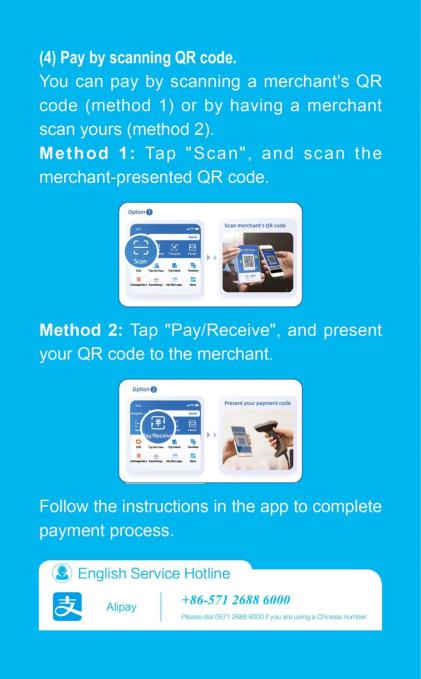
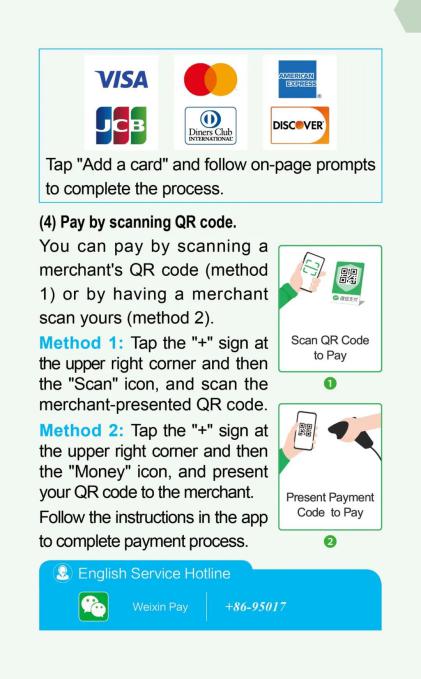
The merchant displays a QR code
- Open “Scan”Look for Scan or 扫一扫, often paired with a camera-frame icon.
- Point at the merchant codeA printed static code may ask you to enter the amount. A cashier-generated code may already contain it.
- Check before approvalConfirm the merchant identity shown by the app and the total in RMB (CNY).
- Verify the resultKeep the result screen and check the in-app bill if the cashier does not receive confirmation.
Useful phrase “Can I scan this?” · 我扫这个可以吗?
The cashier has a scanner
- Open the payment codeLook for Pay/Receive, Payment Code, Money, 付钱/收钱 or 收付款.
- Confirm the spoken or displayed totalThe cashier normally enters the amount on the merchant side.
- Show the live code brieflyLet the checkout scanner read your screen; close it when the transaction is complete.
- Check the resultVerify the merchant and amount in the app before leaving.
Useful phrase “Please scan my payment code.” · 请扫我的付款码。
Does the name or checkout context match where you are paying?
Read every digit and confirm the currency before authorizing.
Wait for the app result; do not rely only on a bank notification or a sound.
Compare the two directions in the official guide
These pages come from the 2025 Guide to Payment Services in China. They are useful for recognising the two payment directions, but the live app interface may look different after an update. Follow the visible function meaning—not the exact colour or layout.
Read the result before paying again
Transaction confirmed
Match the merchant and amount in the in-app bill. You can leave once the sale is confirmed.
Stop before retrying
Open the app’s bill or transaction history. Ask the merchant to check its record; do not immediately create a second payment.
Choose a safe backup
If the in-app record clearly failed, try the other QR direction, a physical card, a second card or RMB cash.
A payment-code screenshot, one-time SMS code, payment password, full card details or passport image. Show a live payment code only at an in-person checkout when you understand the amount being charged.
International cards and RMB cash
Where cards are strongest
Larger hotels, attractions, transport counters and commercial venues are more likely to accept international cards. Check the logos at the terminal instead of assuming every checkout can process your network.
Getting RMB cash
Use an ATM that displays your card network’s logo, or exchange currency at an authorized outlet. Your issuer and the ATM operator may each apply their own terms.
Using cash smoothly
Carry smaller denominations. Cash remains valid, but merchants accustomed to digital payment may not have change for a large note.
Why a second card matters
A card can fail because of issuer controls, network checks or merchant acceptance. A second card from another account reduces the chance of one failure blocking your trip.
Apple Pay, Google Pay and Samsung Pay in China
Do not treat a familiar phone wallet as a universal replacement for China’s QR payment ecosystem.
Payment troubleshooting in the right order
- Check the basics.Mobile data, battery, correct app, correct funding card and the exact RMB amount.
- Change the payment direction.If scanning the merchant fails, ask whether the cashier can scan your payment code—or the reverse.
- Try the physical card.Ask whether the terminal accepts the network logo shown on your card.
- Use your second card or cash.A backup should be independent from the card already linked to the app.
- Contact the right provider.For a rejected card link, contact the issuing bank or the payment app’s official support. Do not pay an unofficial “verification agent.”
At the checkout right now? Use the standalone payment rejection recovery checklist to check for a completed transaction, identify the failed layer and choose a safe backup.
Still setting up? If an international card will not link to Alipay, use the separate card-link troubleshooting checklist. It separates issuer verification from account and app errors without guessing an undocumented cause.
Waiting for a refund? Use the mobile-payment refund follow-up guide to separate a merchant promise, payment-app state and issuing-bank posting without relying on a guaranteed timeline.
Paying in China FAQ
Should I scan the merchant QR code, or show my payment code?
Use the direction the cashier supports. If the merchant displays a QR code, open Scan and scan it. If the cashier has a scanner, open Pay/Receive or the payment-code function and let the cashier scan your screen. Button names and positions can change by app version and language.
What should I do if the payment result is unclear?
Do not immediately pay again. First open the bill or transaction history inside Alipay or Weixin Pay and check the transaction state, merchant and amount. If it shows successful but the merchant has not confirmed receipt, ask the merchant to check its transaction record before retrying.
How do tourists pay for things in China?
For most short trips, prepare Alipay or Weixin Pay with an eligible international bank card, carry the physical card, and keep a modest amount of RMB cash as a backup. Acceptance varies by merchant and card issuer.
Can foreigners use Alipay or WeChat Pay in China?
Yes. Official Chinese guidance says overseas visitors can register with an overseas or Chinese mobile number and link eligible international bank cards. The issuer must authorize the link, and supported card networks, limits and fees can vary by product.
Can I pay cash in China?
Yes. RMB cash remains a valid payment method. Carry smaller notes because some merchants handle mostly digital payments and may not have change for large notes.
Does Apple Pay work in China?
Apple says Apple Pay can be used at compatible merchants showing the relevant Apple Pay, contactless or UnionPay QuickPass marks, subject to an eligible card and merchant acceptance. Do not rely on it as your only payment method.
Can I use Google Pay or Samsung Pay in China?
A wallet being available on your device does not guarantee acceptance by a particular Chinese merchant or terminal. China’s official visitor guidance emphasizes Alipay, Weixin Pay, UnionPay, bank cards and RMB cash, so treat other phone wallets as optional rather than primary.
How this guide was checked
Last reviewed 18 August 2026. We prioritize official guidance and provider documentation. The checkout workflow was also compared against separate Doubao and DeepSeek answers using one identical prompt; unsupported limits, guaranteed acceptance and fixed waiting times were excluded.
- State Council — Guide to Working and Living in China (2025)Mobile payments, international cards, cash and transport payment guidance.
- Ministry of Culture and Tourism / PBOC — Guide to Payment Services in China (2025)Official multilingual payment guide downloads.
- State Council — Payment service guide for overseas visitorsPayment choices and acceptance principles for overseas visitors.
- Apple Support — Learn where to use Apple PayMerchant, terminal and card acceptance conditions.
- Google Wallet Help — Tap to pay with your phoneContactless terminal and supported payment method conditions.
- National Immigration Administration — How to Access Mobile Payment Services in China (2025)Official visitor-oriented mobile-payment video.